
There are currently an estimated 358.7 million businesses all over the world.
It’s no longer enough to just have a plain and simple business if you want to survive this competitive landscape. What you need is a brand – that unique identity or personality that makes you stand out amongst the rest. It’s what separates giants like Nike or Starbucks from the millions of shoe stores or coffee shops in the world.
Building a brand used to involve hiring a marketing agency to carefully craft that personality and visuals for you. But luckily, the rise of technology made this process more accessible and affordable than ever before. Entrepreneurs now have DIY branding platforms to use, giving them access to customizable templates instead of having to create everything from scratch.
One such platform is Design.com. Design.com positions itself as the #1 branding platform in the world, an all-in-one solution for all your business needs. But does the tool really live up to the claim? Is it really the best bang for your buck platform available?
We’ll take a close look at this Design.com review, explore how its tools work, and help you decide if it’s the right solution for your branding needs.
Let’s get started.
What Is Design.com?
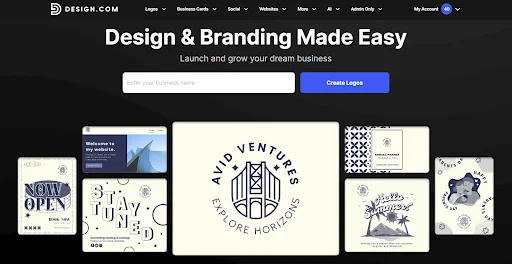
Design.com is an online branding platform that offers premade, customizable templates for your business needs. You can find templates for:
- Logos
- Websites
- Business cards
- Social media graphics (ranging from banners, ads, Reels, profile pictures, etc.)
- Posters
- Flyers
- Email signatures
- Presentations
- Menus
- QR Codes
- …and many more!
Since these templates are premade, users won’t need to illustrate from scratch. They can just find a design they like, add their business info, tweak a few things to better suit their brand identity, then download to use.
This significantly reduces time and effort spent on creating visuals, which is great for busy entrepreneurs. This also gives beginners and non-designers a strong foundation, so they can create polished visuals even if they don’t have technical skills.
Other tools, such as business name generator and a domain name generator, are also available on Design.com. They also offer printing services for branded merchandise like business cards, apparel, mugs, and more.
According to Design.com, their aim isn’t just to give out standalone visuals. It’s to create a cohesive visual identity for your brand, one that can scale with your needs. Whether it’s the essentials like your company name or your logo, down to the more niche needs like link in bio or invoices, they aim to be the branding platform to provide those assets for you.
What Is Design.com’s Logo Maker?
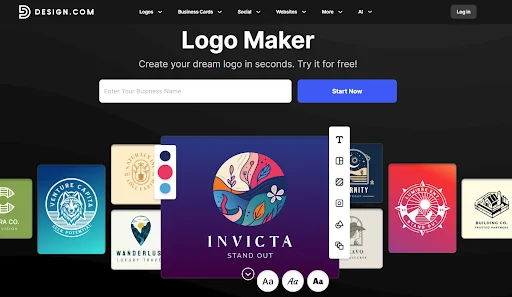
Design.com provides assets for nearly everything you may need in a business. But their most popular offering is their logo maker tool, which they describe as the best logo maker tool in the world.
Rating does indeed back up these claims. It has a high 4.7 Trustpilot rating across thousands of reviews, which indicates that a lot of people do find the tool great and reliable.
Design.com logo maker also has over 360,000+ templates, which is the current largest library among competitors. These templates range across multiple industries, such as food, finance, travel, real estate, skincare, fitness, tech, and more. Logo styles also vary. You can find a good mix of wordmarks, monograms, mascots, icons, and abstract designs. The tool makes the design process easy and fast, but doesn’t sacrifice variety nor aesthetics.
All logos on Design.com are also:
- Designed by professionals to ensure each graphic is high-quality and ready for business use
- Built from their library of 575+ exclusive fonts and 62,000 custom icons, avoiding stock libraries for a truly unique and non-generic appearance
- Carefully reviewed for originality and commercial safety
- Vetted through a thorough approval process, so only top-quality logos appear on the platform
- Fully editable and customizable, allowing you to adjust every aspect of the design to match your vision
- Intuitive and beginner-friendly, with a drag-and-drop editor that requires no technical design skills to use
- Available in multiple high-resolution formats such as PNG, JPG, SVG, EPS, PDF, GIF, and MP4
- Exclusively available on Design.com, ensuring your designs remain unique to the platform
Once you create a logo on Design.com, you have the option to automatically apply your logo’s styling, color scheme, and typography across other materials like business cards or websites. This makes it easy to achieve visual consistency, which is key when building a brand identity.
Design.com AI Tools
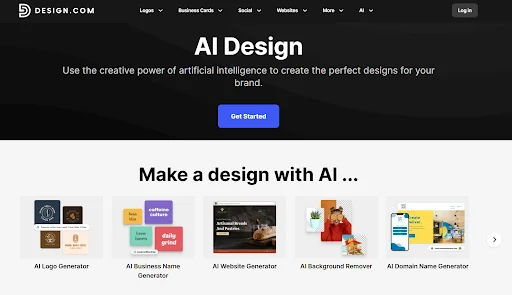
Design.com also offers AI design tools to make the process even faster and easier.
These tools only need your business name or some relevant keywords, which the AI will use to give suitable and tailored results. What we also noticed is the high-quality of the results – since Design.com pulls from their exclusive handcrafted library rather than stock icons or open-source fonts, the designs are inherently more polished and unique. Nothing looks “template”, generic, or robotic, unlike most AI results.
Design.com’s AI tools can also give out thousands of results as opposed to just a dozen from other platforms. Users can also endlessly generate images on Design.com, as they do not have a limit or cap unlike other generators.
The AI design tools that you can find on Design.com are:
- AI logo generator
- AI website generator
- AI business card maker
- AI poster maker
- AI flyer maker
- AI presentation maker
- AI background remover
- AI business name generator
- AI domain name generator
- AI link in bio generator
How To Use Design.com
Design.com is geared toward beginners, so using it is simple and straightforward. All of their tools work the same way, as they use the same editor and interface. So once you are familiar with one tool, you can easily use the rest.
We’ll show a demonstration of how their logo maker tool works to give you an idea.
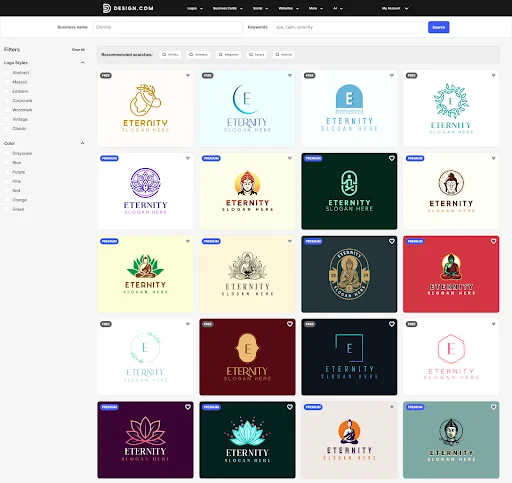
1. Go to your tool of choice. For this sample, we are going to https://www.design.com/logo-maker. Enter your usiness name to get started.
2. Browse the results. You can filter by style or color if needed. You can also add or change keywords to refine your search.
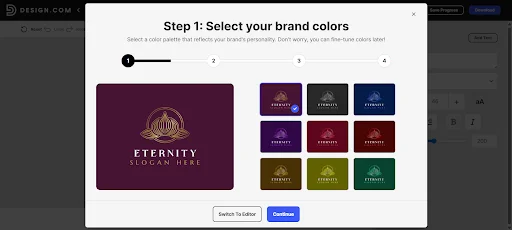
3. Click the design you like. You can opt for this guided editor to help you along with your changes.
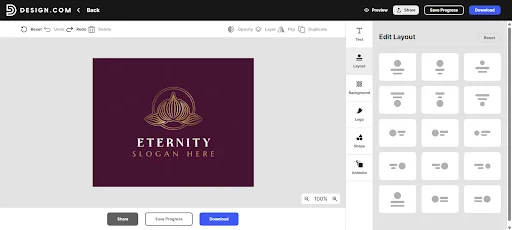
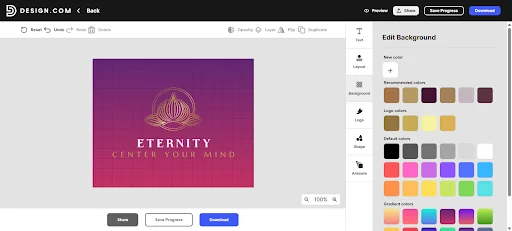
4. You can also go for this manual editor. Here you can change everything, from the layout, text, spacing, color, and more. You can also add icons, gradients, curved text, or animation to make the logo dynamic.
5. Done with the changes? You can click “Share” for others to view and edit your design, click “Save Progress” to go back to it later, or “Download” to get your finished logo.
Pros of Design.com
What makes Design.com worth it to use?
- High-quality templates: Both the customizable templates and AI outputs all pull from the library that is created by top designers all over the world. This means that every design you make on Design.com is guaranteed to be high-quality, polished, and professional-grade.
- Wide range of designs: The templates are suitable for a wide range of industries and are available in various logo styles and types. Users have tons of options to choose from, instead of just getting locked with a handful of designs.
- Fast and efficient AI tools: Design.com offers AI design tools to speed up the process. These AI tools are smart and consider your branding when making the outputs. This means that results are tailor-made to your brand, and not just random generic outputs that need a lot of editing.
- Easy to use: Design.com has an intuitive drag-and-drop editor and simple controls. Anyone, even non-designers, can use the tool with ease.
- Full customization: While Design.com is geared towards beginners, they still offer comprehensive editing tools. You can tweak everything from the color, icon, text, layout, animation, and more. This gives their users creative freedom to achieve the results they want.
- All-in-one platform: Design.com has templates for every business asset you can think of: logos, email signatures, letterheads, presentations, flyers, Instagram Shorts, Facebook ads, and more. Users don’t have to switch between multiple platforms and instead just do them all in one place.
- Excellent customer support: Reviews state that Design.com’s support is top-notch. Users can contact them 24/7 via email or live chat and get the help they need.
Cons of Design.com
Design.com is a great tool but there are still some points to consider.
One is that the platform is only available for web. They have no mobile app available. This may be limiting for users who prefer editing on their phones or while on the go.
Design.com also has less advanced technical integrations for some of their tools. For example, their website builder is great for most website needs but not if you need it for large-scale enterprises or if you want complex e-commerce functionality. But again, Design.com is geared for beginners and not for any highly advanced technical needs.
Pricing of Design.com
How much does a logo on Design.com cost?
Users can browse, edit, or generate logos for free. You can also choose from a selection of free logos to download. It’s completely free, no watermarks or hidden charges.
But if you want to download a premium logo, you’ll have to subscribe to a plan. The costs for that are:
- Saver Plan: $15/month (Logo Pack only)
- Value Plan: $24/month (Logo + Website)
- Premium Plan: $29/month (Logo + Website + more features)
How do you know which designs are free and which are premium? You can look at the top left corner, as they are marked as such.
Pricing will also vary depending on the tool. So the pricing for the logo maker will be different versus the poster maker. You can refer to each of the tool’s pages to see their pricing. But their common thread is that there will be free designs and premium designs to choose from.
Conclusion
So is Design.com the #1 platform for branding? We say yes.
Design.com is a versatile platform that makes professional design accessible. From logos and business cards to your YouTube channel banner, Design.com provides the tools to create a cohesive and professional brand identity with minimal effort.
What we also like is the quality of the templates. While they make editing fast and convenient, it doesn’t mean you get generic or basic designs. Instead, they prioritize giving high-quality outputs that can rival big brands. It evens the playing field for small businesses and solopreneurs, giving them a chance to make their mark.
Give the tool a try and give us your thoughts. Till next time!
FAQs
Q1: What is Design.com?
Design.com is an online branding platform that helps users create logos, websites, business cards, and marketing materials using AI-powered tools and professionally designed templates. It is primarily built for individuals, startups, and small businesses that need quick yet visually cohesive branding without advanced design skills.
Q2: Is Design.com Free to use?
Design.com offers a selection of free templates that can be explored and edited. However, downloading and using premium designs typically requires a paid subscription.
Q3: Are Design.com logos Unique and Safe for Commercial Use?
Logos on Design.com are created by professional designers and reviewed for originality and commercial safety. Users can also choose extended license options if they want exclusive use of a logo design.
Q4: Does Design.com Support Branding beyond Logos?
Yes. Design.com has templates for websites, business cards, social media graphics, posters, and other marketing materials.
Q5: What File Formats can I Download from Design.com?
Design.com allows downloads in multiple high-resolution formats, including SVG, EPS, PDF, PNG, JPG, GIF, and MP4. This makes the designs suitable for both digital use and professional printing.